Wednesday, September 13, 2017

Mystic Cybersource Error Message


  • "UsernameToken authentication failed" - that means you might have a invalid SOAP key. In our case, I had a few extra line breaks in the key. 
  • "Merchant password has expired" - the SOAP key has expired

NOTE: Cybersource has 3 different security keys, one for Security Acceptance (SA key), one for Silent Order Post (SOP key) and one for SOAP (SOAP key). Make sure you generate the right one to replace your old key!

Wednesday, October 8, 2014

Debugging maximum open cursors issue in Java code

If you have some legacy database operations in your java code, sometimes your application will stop working after a while. When you look at your server log, you find something like this:


java.sql.SQLException: ORA-01000: maximum open cursors exceeded
...

Usually you can temporarily solve the problem by restarting the server. But it will come back at you when database connection running out of open cursors again.

Root Cause

The issue here is that every database connection can only have a fixed number of open cursors (defined as the maximum open cursors in the Oracle database). When your code run a query statement, it will open a cursor; when you close the statement, the cursor will be closed. However, sometimes programmers want to run two different queries in the same block of code, and they forget  
to close the first one before using the second. For example:

    PreparedStatement statement = null;
    ResultSet result;
    try {
      // is user an alumnus
      statement = connection.prepareStatement(
          "SELECT package1.is_alum(?) FROM dual ");
      statement.setString(1, _id);
      result = statement.executeQuery();
      
      if (result.next()) {
        _isAlum = result.getInt(1)==1?true:false;

      }

      // is user a student
      statement = connection.prepareStatement(
          "SELECT package1.is_student(?) FROM dual ");
      statement.setString(1, _id);
      result = statement.executeQuery();
      
      if (result.next()) {
        _isStudent = result.getInt(1)==1?true:false;

      }
    }
    finally {
      if (statement != nullstatement.close(); 
    } 
    

The problem is that even though we close the prepared statement at the end, the first statement to check if user is an alum is never closed - a leaked open cursor!

Debug 

So how do you debug such a problem? The server log usually will not tell you where the unclosed statement is. It just informs you that a certain database operation can not run because maximum open cursors are reached. You need to go to the database itself, run a query to find out the SQL statement with the must open cursors:

SELECT s.machine, oc.user_name, oc.sql_text, count(1) cnt
FROM V$OPEN_CURSOR OC, V$SESSION S
WHERE OC.SID = S.SID 
GROUP BY USER_NAME, SQL_TEXT, MACHINE
HAVING COUNT(1) > 9
ORDER BY COUNT(1) DESC

You will get a result like this:

machine      user_name  sql_text                                cnt
my.host.com  ADMIN SELECT package1.is_alum(:1 ) FROM dual 413

Now we know the problem is of this sql statement, so search your java code for a substring of the statement (i.e. search "package1.is_alum" in this case), and then close the statement!


Solution

    PreparedStatement statement = null;
    ResultSet result;
    try {
      // is user an alumnus
      statement = connection.prepareStatement(
          "SELECT package1.is_alum(?) FROM dual ");
      statement.setString(1, _id);
      result = statement.executeQuery();
      
      if (result.next()) {
        _isAlum = result.getInt(1)==1?true:false;

      }

      if (statement != null) statement.close();

      // is user a student
      statement = connection.prepareStatement(
          "SELECT package1.is_student(?) FROM dual ");
      statement.setString(1, _id);
      result = statement.executeQuery();
      
      if (result.next()) {
        _isStudent = result.getInt(1)==1?true:false;

      }
    }
    finally {
      if (statement != nullstatement.close(); 
    } 

Wednesday, November 28, 2012

Set up Eclipse with Maven, Glassfish and Debug

Prerequisite:
  • Eclipse IDE for Java EE Developers Juno Release installed
Install SVN/Maven/Glassfish plugins:
  • Help -> Install New Software...
  • Install subclipse plugin (from: http://subclipse.tigris.org/update_1.8.x)

          (Notes: SVNkit setup instruction can be found here)
  • install Eclipse WTP plugin (from: http://download.eclipse.org/webtools/repository/juno)
  • install m2e - Maven Integration for Eclipse plugin (from: http://download.eclipse.org/technology/m2e/releases/)
  • install Maven Integration for WTP plugin (from: http://download.jboss.org/jbosstools/updates/m2eclipse-wtp/)
  • install GlassFish Application Server plugin (from: http://download.java.net/glassfish/eclipse/juno)

Maven build your project:
  • svn check out a project from your svn repository
  • in "Jave EE" perspective, "Project Explorer" window, right click on your project, "Configure -> Convert to Maven Project"
  • From the top menu, "Run -> run configurations...", add a few maven commands:
    • maven build (set goals as "package")
    • maven rebuild (set goals as "clean package")
    • maven clean (set goals as "clean")
  • Check "Skip Tests" if you don't want to run unit test when you do maven build on your local machine
  • Add maven command as "Run Favorites" in the "run" button: 
  • Select "mvn rebuild" from the green "run" button on the top tool bar to build your project
Set up Glassfish
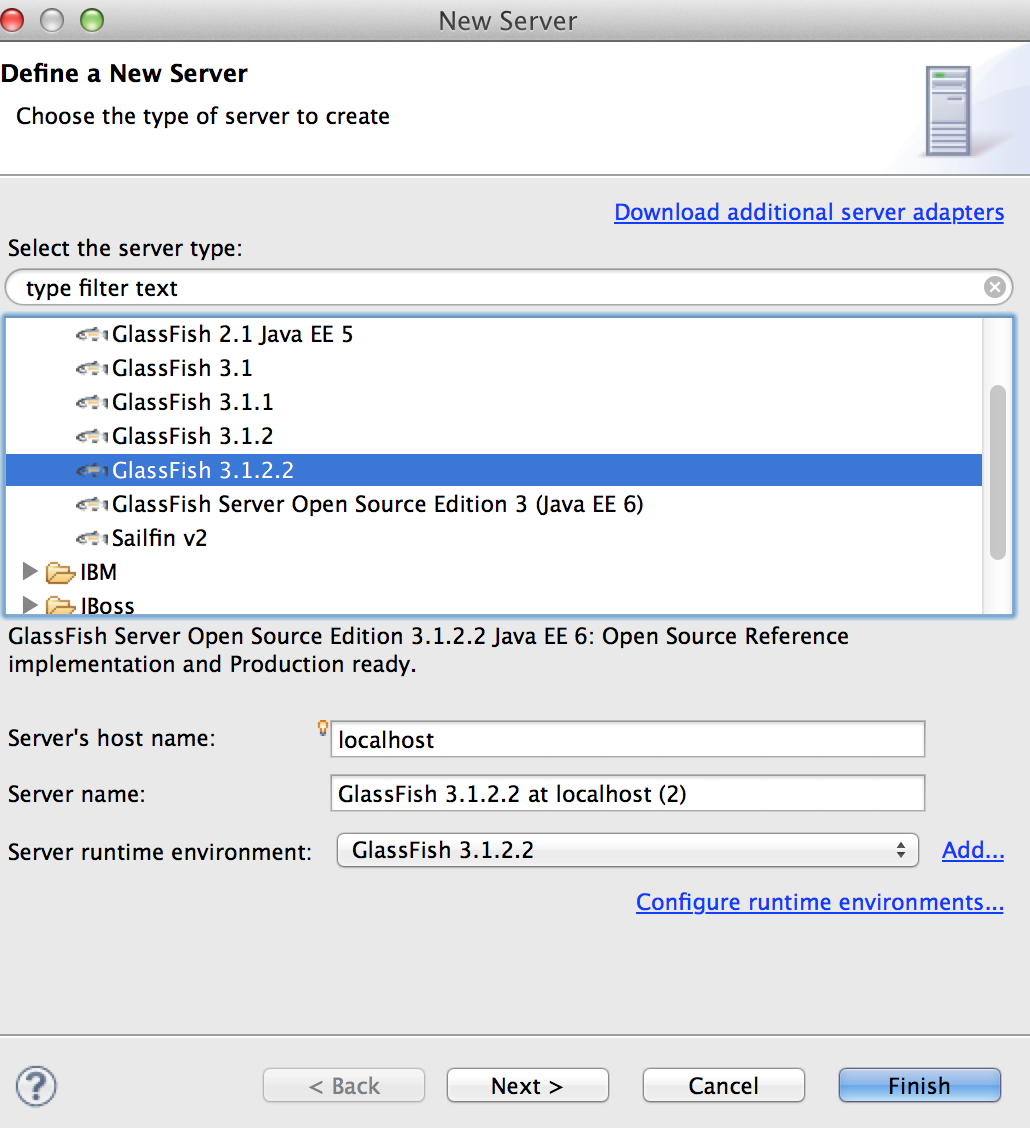
  • Open Servers Window: Window -> Show View -> Servers
  • Right click in the severs window to add a new server
  • Choose a glassfish domain for the server


Deploy project on glassfish
  • in "Jave EE" perspective, "Project Explorer" window, right click on your project, "Run As -> Run on Server".
Setup debug

  • From top menu: Run -> Debug Configurations... -> Remote Java Application -> New
  • Make sure you put in the correct host name and glassfish debug port (in my case: localhost and 8099)
  • Click on "Debug" button to start debugging.

Friday, June 8, 2012

Associate new file type with Netbeans velocity editor plugin

I just installed Netbeans Velocity Editor plugin, by default it only supports *.vm and *.vsl file types. But we use *.vtl as velocity template in our projects.

To enable the velocity support for *.vtl file type, go to "Tools" -> "Options" -> "Miscellaneous" -> "Files", click "New ..." to add a new file extension, then select "text/x-velocity" for "Associated File Type (MIME)", click "Ok".

Netbeans 7.0.1 context menu (right click) very slow

For some reason the context menu of my Netbeans 7.0.1 was really really slow. Sometimes it took more than 30 seconds for it to show after I right click on a class or variable.

I tried to deactivate a few plugins: Restful service, SOAP service, Hibernate, etc according to my google search on the similar issue. But none of them worked.

Finally I decided to upgrade my Netbeans to the latest version of 7.1.2. And the problem is solved!


Thursday, April 12, 2012

Drupal site structure change couldn't be saved

We have a huge site structure in drupal 6. After we upgraded php 5.2.6 to 5.3.3, we got a fatal error when trying to access the site structure page:


Fatal error: Allowed memory size of 134217728 bytes exhausted (tried to allocate 82 bytes) in .....

So we have to put this line in %drupal_home%/sites/default/settings.php:

ini_set('memory_limit', '512M');

This increased the drupal memory limit from 128M bytes to 512M bytes. Now we can see the site structure page. However, when we tried to make some changes, the changes are not saved and no error on the web page. Then we found this warning in the apache error log:

[error] [client xxx.xxx.xxx.xxx] PHP Warning:  Unknown:
Input variables exceeded 1000. To increase the limit change max_input_vars in php.ini. in Unknown on line 0, referer: https://yoursite.com/menu-site-structure

So now we added this line to php.ini:

max_input_vars = 2000

This increased the max input variables from 1000 (default) to 2000, and this solved the problem.


Thursday, April 5, 2012

Debugging Drupal Source Code remotely in NetBeans

Configuring the Server:


1. Make sure PHP XDebug module is installed.
2. Add this section to your php.ini (i.e. /etc/php.ini).  NOTE: make sure you put IP address of the client machine (the debugging computer) for the "remote_host", not the the server IP!

; xdebug config
xdebug.remote_enable=on
xdebug.remote_host=%client IP address%
xdebug.remote_port=9000
xdebug.remote_log=/var/log/xdebug.log
xdebug.idekey=netbeans-xdebug

3. Restart Apache (i.e. $apachectl graceful).
4. Run php -info. And you should see something like this:

xdebug support => enabled
Version => 2.1.4
... 
DBGp - Common DeBuGger Protocol => $Revision: 1.145 $
...
xdebug.idekey => xxxxx => netbeans-xdebug
xdebug.remote_enable => On => On
xdebug.remote_handler => dbgp => dbgp
xdebug.remote_host => xxx.xxx.xx.xxx => xxx.xxx.xx.xxx
xdebug.remote_port => 9000 => 9000
...

Configuring the Client:

1. Make sure PHP plugin is installed for the NetBean.
2. Start NetBeans and create a new PHP project (File->New Project). Select PHP Application from Remote Server and click Next.
3. Give the project a name and local location and click Next.
4. Setup the Remote Connection as appropriate for your server and click Next. Click the "Manage" button the set the remote connection by putting in the username and password. If you use SSH to access the server, leave the password field blank but provide the private key file.
5. NetBeans will construct a list of files it will download. Click Finish to download the files.

Debugging Drupal Remotely:

1. Make sure you open the port for Netbeans if you use Windows 7 and Vista.
2. In Netbeans, set the drupal project as the main project, then go to "Debug Project".
3. Enjoy debugging.

Tuesday, November 8, 2011

Self InclusiveTemplating in JSF 2.0

Page template is a nice feature in JSF 2.0. Combined with EL 2.2, it is so powerful that you can do self inclusive templating in a production environment. Here is an example:

1) client file - index.xhtml:

    <ui:composition xmlns="http://www.w3.org/1999/xhtml"
         xmlns:ui="http://java.sun.com/jsf/facelets"
         xmlns:f="http://java.sun.com/jsf/core"
         xmlns:h="http://java.sun.com/jsf/html"
        
template="/templates/template.xhtml">

      
<ui:define name="title">Page Title</ui:define> 

       <ui:define name="body">Page Body</ui:define>
   </ui:composition>


Here it is using the template.xhtml as the template, then define 2 elements "title" and "body" to pass to template.xhtml.

2) template file - template.xhtml:

<!DOCTYPE html PUBLIC "-//W3C//DTD XHTML 1.0 Transitional//EN"
"http://www.w3.org/TR/xhtml1/DTD/xhtml1-transitional.dtd">
<html xmlns="http://www.w3.org/1999/xhtml"
      xmlns:h="http://java.sun.com/jsf/html"
      xmlns:ui="http://java.sun.com/jsf/facelets">
 

<h:head>
 <title><ui:insert name="title">Title</ui:insert></title>
 <ui:include src="/templates/header.xhtml"/> 

</h:head>
 

<h:body>
  <div id="col2" class="clearfix">

   <div id="col2a">
    <ui:insert name="body">Body</ui:insert>
    <ui:include src="/templates/footer.xhtml"/>
   </div>
 
   <div id="col2b">
    <div id="nav-container">
     <ul id="nav-main">
       <ui:include src="/templates/submenu.xhtml">
        <ui:param name="submenu" value="#{sessionSupport.menuService.getSubMenu(currentSectionUrl)}" />
        <ui:param name="level" value="1" />
      </ui:include>
     </ul>
    </div>
   </div>

  </div>
</h:body>
 

</html>


The two "ui:insert" are the place-holders for page title and body, which are provided from the client file (index.xhtml); "ui:include" pieces are convenient to include a few html snippets to make the code clean and neat. Among them submenu.xhtml is the most interesting one.


3) self inclusive snippet file - submenu.xhml:

<ui:composition xmlns="http://www.w3.org/1999/xhtml"
   xmlns:ui="http://java.sun.com/jsf/facelets"
   xmlns:h="http://java.sun.com/jsf/html"
   xmlns:c="http://java.sun.com/jsp/jstl/core">
 

<c:set var="url" value="#{sessionSupport.breadCrumbs[level+1].url}"/>
<c:set var="requestURI" value="#{sessionSupport.requestURI}" />

<c:forEach items="#{submenu}" var="menuItem" varStatus="status">

<c:choose>
<c:when test="#{sessionSupport.menuService.isSelf(menuItem, requestURI)}">
 <li class="active"><a href="#{menuItem.url}">#{menuItem.name}</a>
   <ul>
    <ui:include src="/templates/submenu.xhtml">
    <ui:param name="submenu" value="#{sessionSupport.getSubMenu(
url
)}"/>
    <ui:param name="level" value="#{level+1}" />
    </ui:include>
   </ul>
  </li>
</c:when>
<c:otherwise>
  <li><a href="#{menuItem.url}">#{menuItem.name}</a></li>
</c:otherwise>
</c:choose>
</c:forEach>


</ui:composition>


The code loops through the menu items at the current level and then calls itself, passing the sub-menu of the next level as a parameter, and then goes on and on, until it walks through the whole tree structure.

Setting up JSF 2.0 and EL 2.2 on Glassfish v2

I am migrating our JSF 1.1 application to JSF 2. Since we are still running Glassfish 2.1.1, I can't use the latest version of JSF (2.1.3), which targets Servlet 3.0 containers like Glassfish v3. So I settled with JSF 2.0. One of the nice features of JSF 2.0 is the build-in page templating support, which is a big help to clean up those messy jsp files.

While setting up the templates, I found that we need to pass parameters to methods in the jsf/xhtml file. But this is NOT supported by default in Glassfish 2.1.1. Comes EL 2.2 for the rescue.

It is kind of easy to set up JSF 2.0 and EL 2.2 on Glassfish v2:

1) Add el-impl-2.2.jar in your project pom.xml (assuming you use maven), which will install two jar files (el-impl-2.2.jar and el-api-2.2.jar) in your WEB-INF/lib after build:

    <dependency>
      <groupId>org.glassfish.web</groupId>
      <artifactId>el-impl</artifactId>
      <version>2.2</version>
    </dependency>

2) Copy el-impl-2.2.jar and el-api-2.2.jar to %Glassfish_Home%/lib/

3) Download jsf 2.0 from http://javaserverfaces.java.net/, then copy jsf-impl.jar and jsf-api.jar to %Glassfish_Home%/lib/

4) Add "classpath prefix" in glassfish domain configuration file domain.xml (or you can use the Admin console: Application Server -> JVM Settings -> Path Settings -> Classpath Prefix):

<java-config classpath-prefix="${com.sun.aas.installRoot}/lib/jsf-api.jar${path.separator}${com.sun.aas.installRoot}/lib/el-api-2.2.jar"
...


You are all set to roll!

Saturday, August 27, 2011

Set up Apache for site maintenace

We want to set up the site maintenance page from 5am to 3pm on a certain day to do database upgrade. Then we want to test the site internally before opening to the public. This is what I would do in Apache configuration:

# rewrite condition1: 5am to 3pm
# rewrite condition2: allow only internal ip
# rewrite condition3: any database driven page (".dyn", ".jsp", or ".vm")

RewriteCond %{TIME_HOUR}%{TIME_MIN} >0500
RewriteCond %{TIME_HOUR}%{TIME_MIN} <1500
RewriteCond %{REMOTE_ADDR} !^255.255.0.0*$
RewriteCond %{REQUEST_URI} \.(dyn|jsp|vm)$
RewriteRule ^/(.+)$ http://my.site.com:80/sitedown.html [L,R]

Wednesday, August 10, 2011

Can't deploy / undeploy web applications on Glassfish

When we tried to publish a new web application to Glassfish (v2.1.1) this morning, we got the following mystic message:

CLI171 Command deploy failed : While redeploying, trying to stop the application in target server failed; Error Flushing ConfigContext com.sun.enterprise.config.ConfigContext: Url=$glassfish_home/domains/release/config/domain.xml, ReadOnly=false, ResolvePath=true, LastModified Timestamp=1312828827000, isChanged=false, Autocommit=false, isConfigBeanNull=false

It took us a while to realize that somehow domain.xml lost the write permission overnight, so Glassfish cannot add or delete the web application in domain.xml.

Glassfish team should hire someone who can write messages for a normal human being :)

How to start/stop all the cron jobs on Linux

Log in as root on the server:

All the cron jobs are defined in /var/spool/cron

To stop all cron jobs: /etc/init.d/crond stop

To start all cron jobs: /etc/init.d/crond start

Wednesday, May 25, 2011

Distinguish between different kinds of JSF beans

Name: Model Bean
Typical Scope: Session
Description: This type of managed-bean participates in the "Model" concern of the MVC design pattern. When you see the word "model" -- think DATA. A JSF model-bean should be a POJO that follows the JavaBean design pattern with getters/setters encapsulating properties. The most common use case for a model bean is to be a database entity, or to simply represent a set of rows from the result set of a database query.

Name: Backing Bean
Typical Scope: request
Description: This type of managed-bean participates in the "View" concern of the MVC design pattern. The purpose of a backing-bean is to support UI logic, and has a 1::1 relationship with a JSF view, or a JSF form in a Facelet composition. Although it typically has JavaBean-style properties with associated getters/setters, these are properties of the View -- not of the underlying application data model. JSF backing-beans may also have JSF actionListener and valueChangeListener methods.

Name: Controller Bean
Typical Scope: request
Description: This type of managed-bean participates in the "Controller" concern of the MVC design pattern. The purpose of a controller bean is to execute some kind of business logic and return a navigation outcome to the JSF navigation-handler. JSF controller-beans typically have JSF action methods (and not actionListener methods).

Name: Support Bean
Typical Scope: session / application
Description: This type of bean "supports" one or more views in the "View" concern of the MVC design pattern. The typical use case is supplying an ArrayList to JSF h:selectOneMenu drop-down lists that appear in more than one JSF view. If the data in the dropdown lists is particular to the user, then the bean would be kept in session scope. However, if the data applies to all users (such as a dropdown lists of provinces), then the bean would be kept in application scope, so that it can be cached for all users.

Name: Utility Bean
Typical Scope: application
Description: This type of bean provides some type of "utility" function to one or more JSF views. A good example of this might be a FileUpload bean that can be reused in multiple web applications.

More details can be found at http://java.dzone.com/articles/making-distinctions-between

Monday, December 20, 2010

Glassfish Woe (Part 2)

I did some tests on our development server:
1) When connecting to development database, I ran a load test to have 10 users login/logout at the same time. Everything looked fine.
2) Then I switched to the production database, same load test, now I could reproduce the transaction error.

So it seems that something got changed on our production database to cause the transaction error. But it is hard to pinpoint what it was. So for now, I implemented a workaround and it seems to be working. Instead of using resource type javax.sql.XADataSource, I am now using javax.sql.DataSource. The difference is that XA type can handle global transactions while non-XA can only handle local transactions. Since we are not running in distributed environment, this seems to be working for us. And the server has been quiet over the weekend.

Friday, December 17, 2010

Content is not allowed in prolog

While working on the glassfish crash issue, I stumbled upon an error in the log:

[Fatal Error] servicetag-registry.xml:1:1: Content is not allowed in prolog.


It happens to be an extra character in the lib/registration/servicetag-registry.xml file. And it was introduced 6 months ago!

Thursday, December 16, 2010

Glassfish Woe

Our website running on Glassfish 2.1.1 crashed over the weekend. We found a lot of transaction errors in the log:

JTS5041: The resource manager is doing work outside a global transaction
oracle.jdbc.xa.OracleXAException
...

When this happens, the connection associated with the transaction will become unusable, then the connection pool has to create more and more connections. At some point, it will reach the maximum, and when all the connections in the pool become stale, the site will crash.

After some research on google, it seems to be caused by a parallel transaction bug described in http://java.net/jira/browse/GLASSFISH-11920.

But the weird thing is that we didn't change anything recently and all this started to happen out of nowhere.

This really drives me nuts!